Deployment Strategies Explained: Choosing the Right Approach for Your Production Systems
Summary
Deploying to production is risky. This guide breaks down the most common deployment strategies with visual animations, real-world examples, and practical advice on when to use each approach.
The build is green and the tests pass. Now you have to get it into production without breaking anything, and that's the part CI doesn't help with.
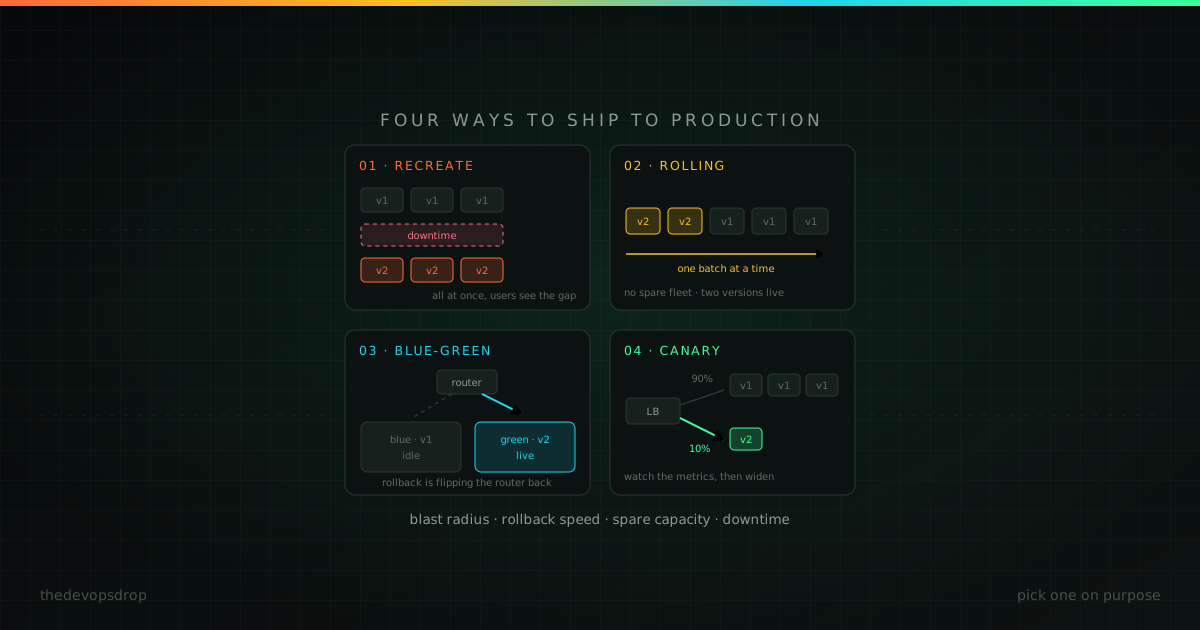
The strategy you pick decides four things: how many users are affected if it goes wrong, how fast you can undo it, how much infrastructure you're paying for, and whether anyone sees downtime. Here's how the common approaches trade those off.
1. Recreate
Stop the old version, start the new one.
Recreate Deployment
Notice the downtime period when no instances are running. This is the key characteristic of recreate deployments.
Shut down everything running version A, wait for it to drain, start version B, send traffic to it. That's the whole strategy.
kubectl delete deployment admin-dashboard
kubectl apply -f dashboard-v2.yaml
kubectl rollout status deployment/admin-dashboard
Use it when you have a maintenance window and nobody is watching: internal tools, batch jobs, dev and staging environments, anything with no live sessions to preserve.
It's simple, needs no extra infrastructure, and gives you a clean version boundary with no mixing. The cost is obvious: there's downtime, everyone hits the new version at once, and rolling back means another full redeploy.
Picture a batch processor that only runs 2am to 5am. Deploy at 1am and, if it goes badly, there's a full hour to put the old version back before the window opens. Downtime costs nothing there, so simplicity wins.
2. Rolling
Replace instances a few at a time.
Rolling Deployment
Notice how instances are updated one at a time. The load balancer removes each instance during the update, ensuring zero downtime.
Pull one instance out of the load balancer, upgrade it, wait for health checks, put it back, repeat. Kubernetes does this by default.
apiVersion: apps/v1
kind: Deployment
metadata:
  name: api-service
spec:
  replicas: 10
  strategy:
    type: RollingUpdate
    rollingUpdate:
      maxUnavailable: 2  # how many can be down at once
      maxSurge: 2        # how many extra can exist at once
  template:
    spec:
      containers:
      - name: api
        image: api:v2.0.0
Use it when the app is stateless, can tolerate two versions running at once, and you want zero downtime without paying for duplicate infrastructure. This is the sensible default for most APIs and web services.
The catch is version mixing. During the rollout both versions serve real traffic, so your API has to be backward compatible with itself and both versions have to work against the same database schema. Rollback is also just another rolling update in reverse: a bad deploy takes as long to undo as it took to apply.
Run 50 instances with maxUnavailable: 5 and a bad build only reaches five of them before health checks fail and the rollout halts. The other forty-five keep serving the old version the whole time.
3. Blue-green
Two complete environments. Flip between them.
Blue-Green Deployment
Both environments run simultaneously. Traffic switches instantly from Blue to Green. Blue stays running as a hot standby for quick rollback.
Blue is production. Deploy to green, test it properly, point the load balancer at green, and keep blue running as a hot standby.
# bring green up
aws ecs update-service --cluster prod \
  --service payments-green --desired-count 10

aws ecs wait services-stable --cluster prod --services payments-green

# flip traffic
aws elbv2 modify-listener --listener-arn $LISTENER_ARN \
  --default-actions Type=forward,TargetGroupArn=$GREEN_TARGET_GROUP

# scale blue down, but don't kill it
aws ecs update-service --cluster prod \
  --service payments-blue --desired-count 1
Use it when instant rollback is a hard requirement, or version mixing is genuinely unacceptable: payments, regulated systems, anything with consistency requirements that two concurrent versions would violate.
Rollback is the entire point: you point the listener back at blue and you're done in seconds. You also get to test green in a real environment before a single user touches it.
You pay for that with double infrastructure during the transition, and the database is still shared, so schema changes don't get a free pass. Resist the urge to tear blue down the moment the flip succeeds. Keep it warm for at least one incident cycle, or you've paid for the rollback capability and thrown it away.
A patient-records platform is a good fit for this, because version mixing there would create compliance problems. Deploy to green, run the test suite against anonymised data, flip, and you can be back on blue in under 30 seconds if anything looks wrong.
4. Canary
Send a slice of real traffic to the new version and watch what happens.
Canary Deployment
Traffic gradually shifts from the stable version to the canary. If metrics degrade, the deployment is aborted and traffic returns to the stable version.
Deploy alongside the current version, route 5% of traffic to it, watch error rates and latency and whatever business metric matters. If it holds, go to 25%, then 50%, then 100%. If it doesn't, drop it back to zero.
def route_traffic(user_id):
    return "canary-v2.0.0" if hash(user_id) % 100 < 5 else "stable-v1.9.5"

canary_errors = get_error_rate("canary-v2.0.0")
stable_errors = get_error_rate("stable-v1.9.5")

if canary_errors > stable_errors * 1.5:
    set_canary_traffic_percentage(0)   # abort
else:
    increase_canary_traffic()
Use it when you can't predict how a change will behave until real users hit it: a new ranking algorithm, a performance rewrite, a redesigned checkout flow.
This is the only strategy that gives you genuine production signal before full commitment, and the blast radius stays small the whole time. It needs traffic volume to work, though: at ten requests a minute, a 5% canary tells you nothing. It also needs real observability, since you can't make a rollout decision on metrics you don't have, and full rollout takes hours or days instead of minutes.
Netflix's streaming platform is a well-known example of this at scale: a change rolls out to a small slice of streams first, playback quality and encoding metrics get watched, and the rollout only widens if the numbers hold.
The automated analysis step is what makes canary worth the complexity. Without automatic metric evaluation and automatic abort, a canary is just a slow rolling deploy with extra YAML.
Side by side
| Strategy | Downtime | Rollback | Cost | Complexity | Blast radius |
|---|---|---|---|---|---|
| Recreate | Minutes | Slow | Low | Low | 100% |
| Rolling | None | Medium | Low | Medium | Gradual (10-50%) |
| Blue-green | None | Instant | High | Medium | 0% or 100% |
| Canary | None | Fast | Medium | High | 1-10% initially |
Rolling is the default. Move to blue-green when you need guaranteed fast rollback and can pay for it. Move to canary when the risk is behavioural rather than structural and you have the traffic and metrics to detect it.
You can combine them, too. Deploying to green and then shifting traffic gradually gives you both instant rollback and controlled exposure, which is what most managed progressive-delivery tools actually do under the hood.
The database will ruin all of this
None of these strategies help if the schema changed incompatibly. Rolling and canary run two versions at once by definition, and blue-green needs the old version to still work during a rollback. So schema changes have to be expand/contract:
- Expand: add the new column as nullable. Both versions work.
- Migrate: deploy code that writes to both, backfill the old rows.
- Contract: only after the old version is fully retired, drop the old column.
Doing this in one step is the single most common reason a "safe" deployment strategy turns out not to be.
-- breaks the running version immediately
ALTER TABLE users DROP COLUMN phone;
That statement is fine as step 3 and catastrophic as step 1.
Health checks decide whether any of it works
Every strategy above depends on knowing whether a new instance is actually healthy. A health check that returns 200 as soon as the process starts will happily roll a broken build across your whole fleet.
livenessProbe:
  httpGet:
    path: /health/live
    port: 8080
  initialDelaySeconds: 30
  periodSeconds: 10
  failureThreshold: 3

readinessProbe:
  httpGet:
    path: /health/ready
    port: 8080
  initialDelaySeconds: 10
  periodSeconds: 5
  failureThreshold: 2
Readiness should confirm the things that actually make the instance usable: the app started, database connections are established, required dependencies are reachable, config loaded. Liveness should be much dumber: it restarts the process, so anything that checks a dependency will cascade an outage across the fleet.
Rolling back
# rolling
kubectl rollout undo deployment/api-service
kubectl rollout undo deployment/api-service --to-revision=3

# blue-green: point the listener back
aws elbv2 modify-listener --listener-arn $LISTENER_ARN \
  --default-actions Type=forward,TargetGroupArn=$BLUE_TARGET_GROUP

# canary: send it back to zero
kubectl patch service api-service \
  -p '{"spec":{"selector":{"version":"stable"}}}'
Two other things worth doing: decouple deploys from releases with feature flags, so shipping code and turning a feature on are separate decisions. And make sure you have error rates, latency percentiles, and at least one business metric wired to alerts. You can't roll back what you can't see.
Tooling
Kubernetes gives you rolling updates natively and blue-green with a bit of label juggling; canary needs Argo Rollouts or Flagger. ECS does rolling natively, blue-green through CodeDeploy, and canary via ALB weighted target groups or App Mesh. On the GitOps side, Argo CD pairs with Argo Rollouts for progressive delivery, Flux pairs with Flagger for the same job, and Spinnaker does multi-cloud canaries.
For blue-green in Terraform, the switch is usually just a variable:
resource "aws_lb_listener_rule" "production" {
  listener_arn = aws_lb_listener.app.arn

  action {
    type             = "forward"
    target_group_arn = var.active_target_group
  }
}
The point
There's no best strategy, only the one that matches your risk tolerance and budget. Start with rolling. Add blue-green when rollback speed becomes a real requirement. Add canary when you need production signal before committing.
What matters more than the choice is having made one deliberately, and having practised the rollback before you need it.