Stop Learning Every AWS Service - Start With These 20
Summary
AWS has hundreds of services, but you don't need to know them all. Learn which 20 services actually matter for real projects and how to think about AWS architecture like a pro.
Open the AWS console and you're looking at a few hundred services. Most people react by trying to learn all of them, get about forty in, and quietly give up.
You don't need them. Almost every real project runs on the same small set, and the skill worth having isn't recalling what AppSync does. It's understanding how the core pieces fit together.
The ones that actually come up
Where your code runs
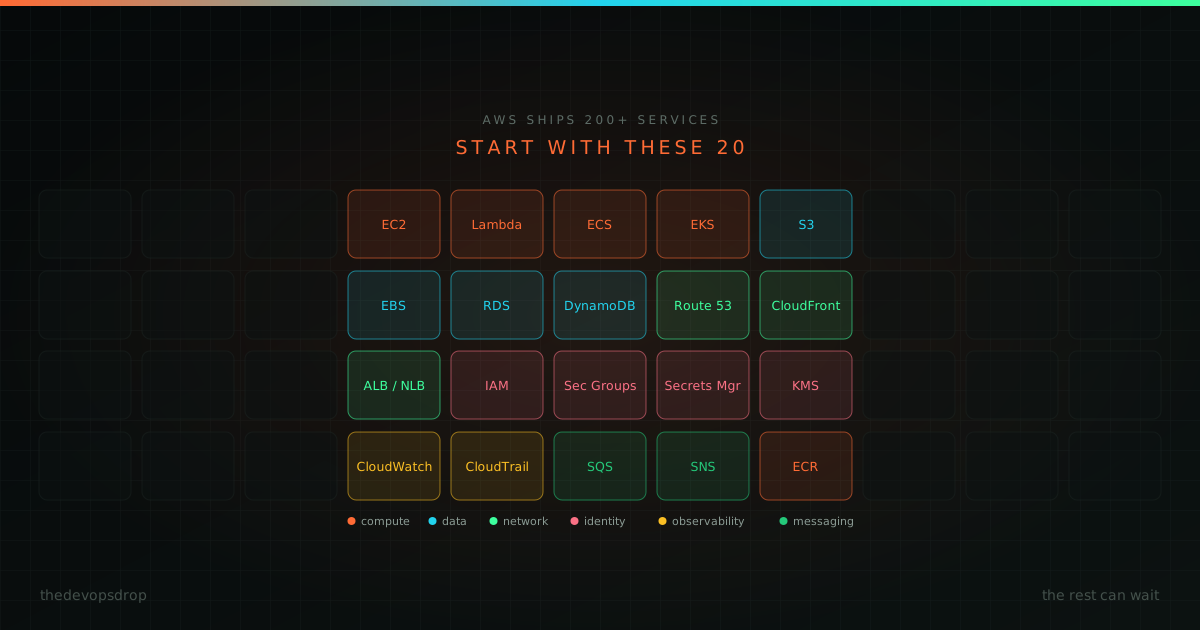
Pick one: EC2 (virtual servers, the "I need full control" option), Lambda (upload code, AWS runs it), ECS (Docker containers without running Kubernetes), or EKS (managed Kubernetes, if your team already lives there).
Most new projects should start with Lambda or ECS. Reach for EKS when you have a reason, not because it's on job descriptions.
Where the data lives
RDS for relational data: MySQL, PostgreSQL, anything with joins and transactions. DynamoDB for key-value access patterns you know in advance and need to be fast at any scale.
For files: S3 for objects (images, backups, logs, static assets). EBS for block storage attached to an EC2 instance.
How traffic reaches you
Route 53 for DNS. CloudFront as the CDN, serving cached content from a location near the user. A load balancer (ALB for HTTP, NLB for TCP) to spread requests across instances and stop sending traffic to unhealthy ones.
Who's allowed to do what
IAM is the foundation: every permission decision in AWS runs through it, and it's the service most worth understanding properly. Security groups are the instance-level firewall. Secrets Manager holds credentials and API keys so they don't end up in Git.
KMS handles encryption keys for everything else.
Knowing what's happening
CloudWatch for logs, metrics, and alarms: is the app healthy, is it slow, when did that change. CloudTrail for the audit log of who did what in the account, which is where you go when something changed and nobody admits to changing it.
How services talk
SQS is a queue: one component drops a message in, another picks it up when it's ready. SNS fans an event out to multiple subscribers. Between them they decouple most of the things that otherwise break together.
Containers and deployment
ECR stores your container images. CodePipeline and CodeBuild cover build, test, and deploy if you're staying inside AWS, though plenty of teams use GitHub Actions instead and just deploy into AWS.
What people actually get asked
Nobody asks you to list services. They put an architecture diagram in front of you and ask what's going on.
If you can answer these, you can read almost any AWS architecture:
- Where does the code run? (EC2, Lambda, ECS, EKS)
- Where's the data? (RDS, DynamoDB)
- Where are the files? (S3)
- How does traffic get there? (Route 53, load balancer, CloudFront)
- Who can access what? (IAM, security groups)
- How do we know it's working? (CloudWatch)
- What changed? (CloudTrail)
- How do the pieces talk? (SQS, SNS)
A better way to learn it
Pick a project. Work out which services it needs, usually three to five. Learn those properly, including how they connect and where they fail. Add more only when a real problem requires them.
The reason this works is that services in isolation don't stick. IAM makes sense when you're debugging why your Lambda can't read from S3, not when you're reading about roles and policies in the abstract.
A worked example
Say you're building a photo-sharing app. You need:
- Lambda or EC2 for the backend API
- S3 for the photos
- RDS for accounts and metadata
- CloudFront so images load fast worldwide
- Route 53 for the domain
- IAM to control access between all of it
- CloudWatch to see when it breaks
- CodePipeline or GitHub Actions to deploy
Eight services. No SageMaker, no Kinesis, no AppSync. Get those eight right and you've built something real.
The shape most architectures take
User visits yourapp.com
         │
         ▼
   Route 53 (DNS)
         │
         ▼
   CloudFront (CDN)
         │
         ▼
   Load balancer / API Gateway
         │
         ▼
   Lambda / EC2 / ECS
         │
         ▼
   RDS / DynamoDB
That's most of AWS. Everything else is optimisation, or a specialised service for a problem you don't have yet.
Where to start
This week, pick one service from the list, read the overview, and actually deploy something with it. This month, get clear on the five to ten services your project uses and how they connect. After that it takes care of itself: you'll pick up new services when a problem forces you to, which is the only way they ever stick anyway.
The engineers who are good at AWS aren't the ones who memorised the most services. They're the ones who can look at a problem and say "here's the right tool, and here's how it fits with everything else."